MP4 · MOV · HEVC · RESTORED
Repair for corrupted video.
Container reconstruction and audio sync for MP4, MOV and HEVC files — locally on macOS and Windows. From GoPro, Sony, DJI, Canon, iPhone. No cloud upload, no waiting.
Analysis is free · You see the result before you pay
Successfully tested on footage from
- GoPro
- Sony
- DJI
- Canon
- Apple
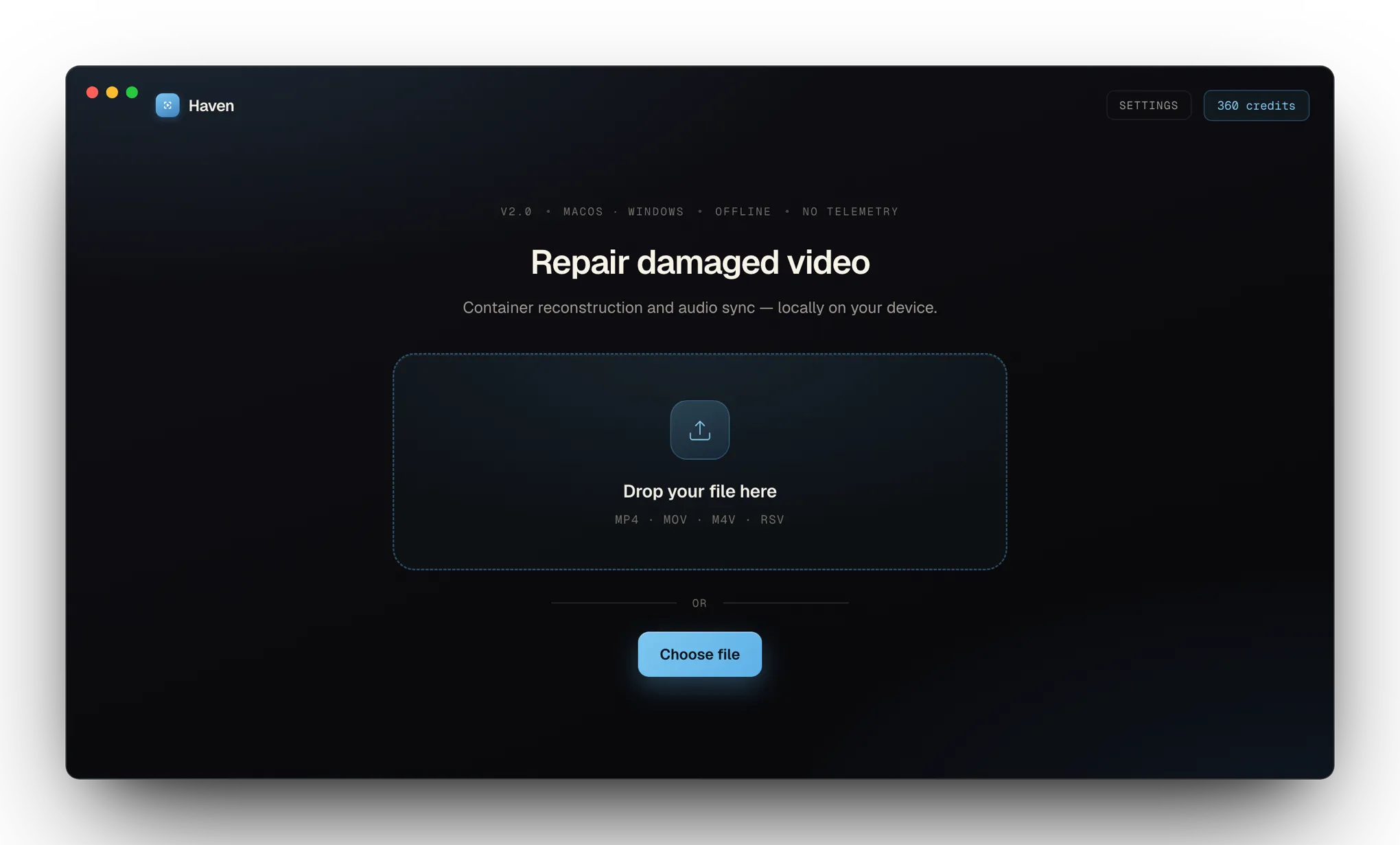
Instant diagnosis · In your browser · No upload
We'll analyze your file right now.
Drop your broken MP4 or MOV in here. The analysis runs entirely in your browser, on your machine. Nothing gets uploaded — you don't have to trust us, because your file never leaves your computer.
Drop your file here
or click · MP4, MOV, M4V
The problem
You have the recording.
It just won’t open.
01
After a crash
The record button was stopped too soon. Or the battery died mid-take. The file is there — but broken.
02
After a formatting mistake
The card got ejected too early. Other tools call it unreadable. You know the footage is still on there.
03
Noticed hours later
Everything looked fine. Then the import throws an error. Now you’re stuck with a corrupt file and no time.
“Haven was built for exactly these moments.”
Files analyzed
Success rate
To first result
Figures reflect a projection toward the 94-percent success corridor from the public beta.
A look inside the app
Not a command-line tool.
A tool you actually understand.
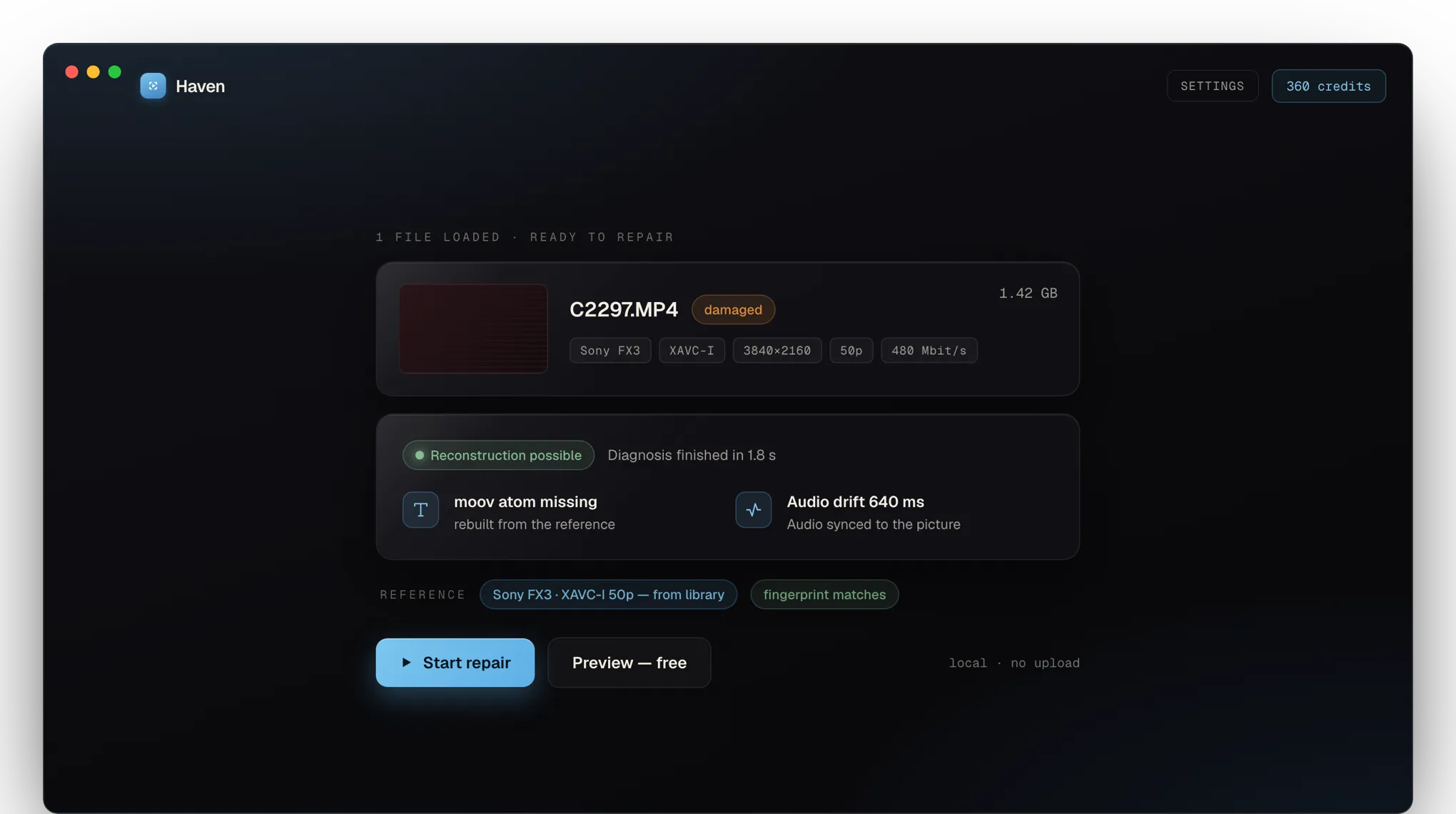
Diagnosis → repair
Check first, then repair — in one flow.
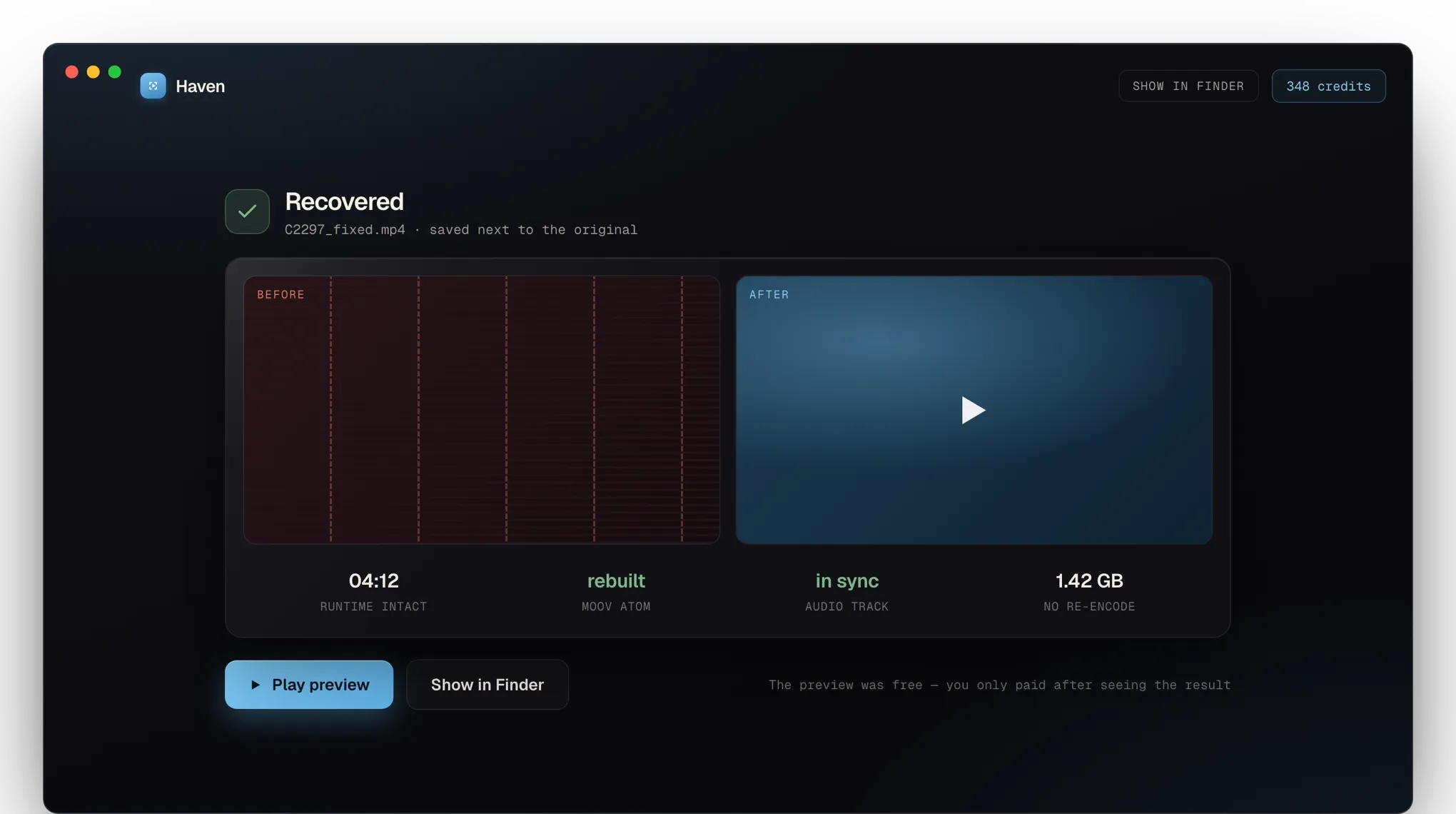
Haven reads the file, identifies the camera and the damage, and tells you whether reconstruction is possible — before you start anything.
- Camera, codec and bitrate are detected automatically
- An honest upfront verdict instead of flying blind
- Rebuilds the container without re-encoding — no quality loss
What sets Haven apart
Built for the problems
everything else gives up on.
Privacy
100% local
Your footage never leaves your computer. No uploads, no servers. More private than any cloud tool.
Sync
Audio drift is fixed automatically
Other tools hand video back with the sound out of sync. Haven detects audio drift and noise bursts and aligns the track frame-accurately.
Performance
Apple Silicon native
Fully optimized for M1 through M4. Four times faster than Java-based tools, light on RAM, barely spins the fans.
Codecs
Every pro codec
H.264, HEVC (10-bit 4:2:2), ProRes, XAVC, GoPro, DJI. Including DiskDrill-recovered files with a broken header.
Preview
Preview before you pay
You see and hear the repaired video before you pay. Only successful repairs are charged.
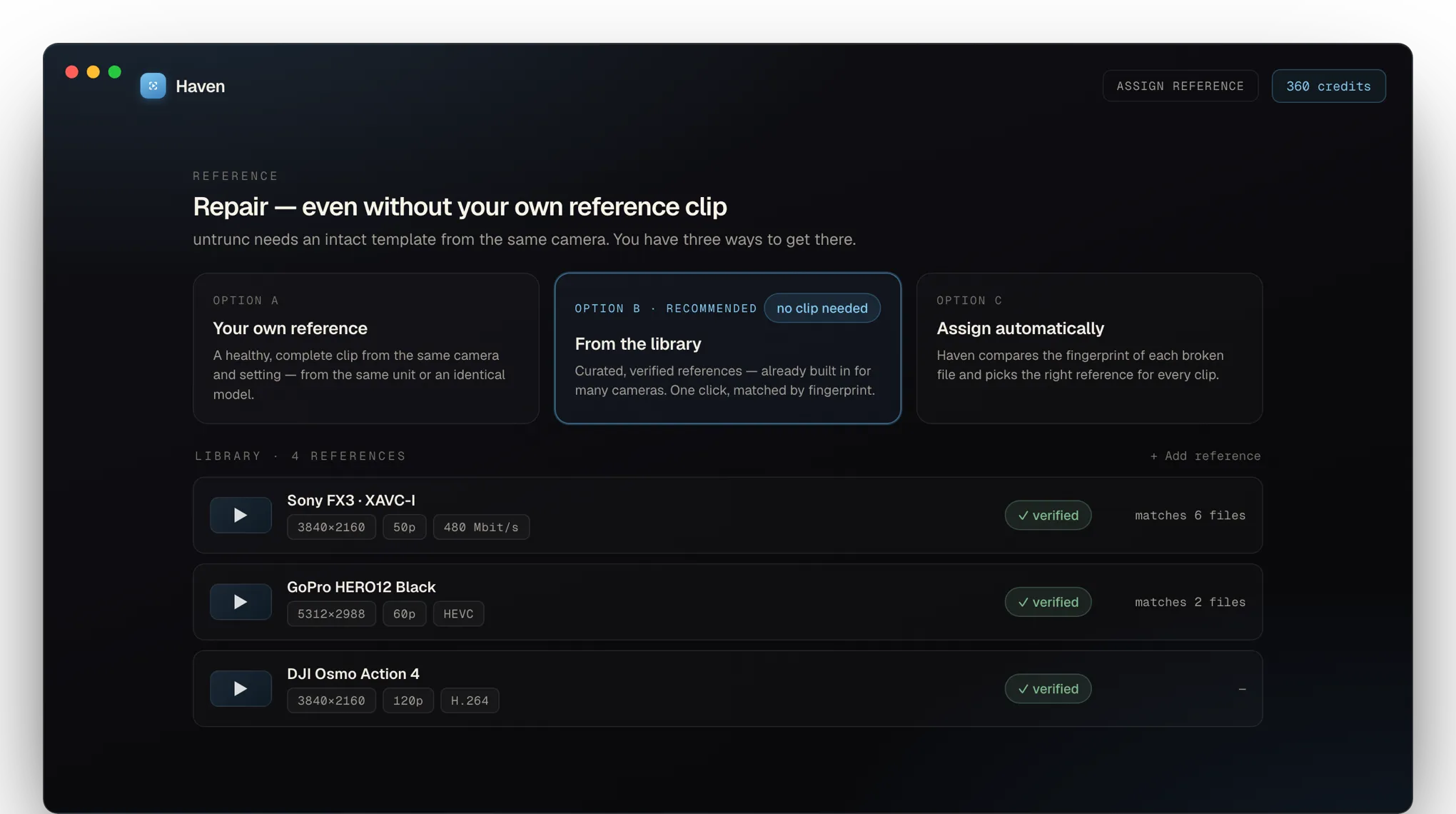
Reference
Reference matching
For badly damaged files, Haven uses an intact file from the same camera as a blueprint. That’s how it fixes what others can’t.
Focus
Not an all-in-one suite.
A tool for exactly one thing.
Most programs that happen to repair video on the side try to do everything — photos, hard drives, deleted files. Haven does one thing: make damaged camera video playable again.
Specialized
One thing, done right.
Container reconstruction, reference matching and audio sync for camera video — not a side feature of a bloated suite, but the whole point.
Local
Stays on your machine.
Native on Apple Silicon, no cloud, no upload. Your footage never leaves your device — even the diagnosis runs completely offline.
Fair
See it first, then pay.
Diagnosis and preview cost nothing. You pay in credits — only for the files you actually keep. No subscription.
How it works
Four steps. Five minutes.
- 01
Drop in your file
Drag the broken MP4 into Haven. The analysis runs in seconds — header, frame structure, audio streams.
- 02
Pick a reference
For badly damaged files, add an intact recording from the same camera. Haven uses it as the blueprint.
- 03
Repair & preview
The container is rebuilt, audio resynced, noise stripped. You see and hear the result — before you pay.
- 04
Export
Save the repaired file wherever you want. Your originals are never overwritten.
Pricing
Credits, not a subscription.
1 credit = 10 seconds.
You buy credits once and use them whenever you need them. The preview of every file is free — credits are only deducted when you unlock the full repair.
Starter
60 credits
≈ 10 min repairable
For a single important recording, up to 10 minutes.
- 0.90 €/min
- Credits never expire
- Preview always free
Standard
360 credits
≈ 60 min repairable
A full hour of repairable material — a complete interview, say.
- 0.48 €/min
- Credits never expire
- Preview always free
Pro
1,800 credits
≈ 300 min repairable
Five hours — for editors and studios with a steady need.
- 0.26 €/min
- Credits never expire
- Preview always free
One-time · No subscription · Credits never expire · Top up anytime
Founder · Engineer
Who built this
I built Haven because I lost footage that mattered to me.
In 2026 I was shooting a project on the Sony FX3. After the shoot, the SD card got formatted by accident. DiskDrill recovered the files — but none of them would open. Headers destroyed, audio drifting, not a single tool could get through.
Three weeks of reverse-engineering later, I had the footage back. The tools that existed were either cloud-only, expensive, or simply not built for what goes wrong with pro codecs on modern cameras.
Haven is the clean version of what I needed back then. A tool for creators who want to know what happened before they pay — and whose footage stays on their own machine.
FAQ
Common questions.
How does the credit system work?
1 credit = 10 seconds of repairable video. A 4-minute clip costs 24 credits, a full hour 360. You buy credits in packs (Starter to Pro), they never expire, and you can top up anytime. You only pay when you unlock a file — before that, you always get a free preview snippet.
What exactly happens in the free preview?
Haven repairs a short snippet (around 30 seconds) of your file and shows it to you, playable. You see the picture quality, hear the audio sync, and know the repair of your full file will work. Only then do you spend credits to unlock the whole thing — nobody waits half an hour just to find out the repair failed.
Which file formats are supported?
Haven handles MP4, MOV and HEVC files — including 10-bit variants and ProRes containers. Sources: GoPro, DJI, Sony, Canon, Panasonic, iPhone, Android, and screen recordings from OBS or QuickTime.
Does it work on files recovered with DiskDrill or Recoverit?
Yes — it’s actually one of our main use cases. Recovery tools often produce files with zero-padding and missing headers. Haven can fully reconstruct those with a reference file from the same camera.
What happens to my videos?
They never leave your computer. Haven is a native macOS and Windows app that runs completely offline. We don’t even know which files you’re repairing.
What if the preview doesn’t convince you?
Then you don’t spend any credits — the file stays locked and you pay nothing. That’s exactly what the preview is for: you see the result before you spend money. And if you’re unhappy after unlocking: a 30-day money-back guarantee on every pack you buy.
Can I repair several files at once?
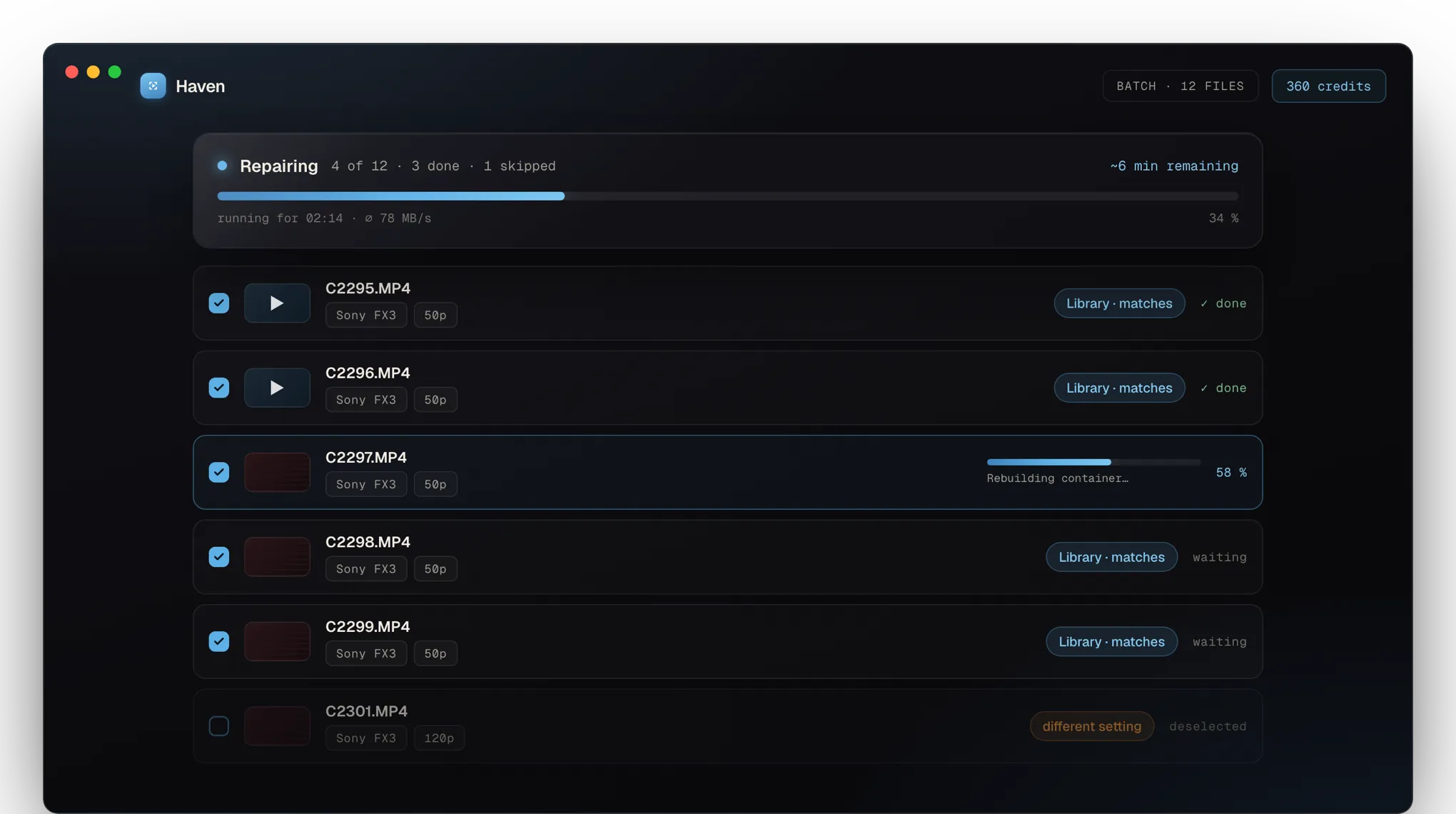
Yes. Drop in all your files, get a free preview per file, add the ones you want to the cart and unlock them together. A global progress bar shows the estimated time remaining while everything repairs in the background.
Why no subscription?
Repair is an occasional need. You need Haven when something breaks — not every month. We don’t want to sell you a subscription you don’t actually need. Instead: buy credits when you need them, and they never expire.
What if I don’t have enough credits?
The cart shows the total cost before you unlock. If your balance falls short, you can top up with one click — the pack lands in your account instantly. Larger packs are cheaper per credit.
Do I need any technical knowledge?
No. Drop in the file, wait for the preview, optionally pick a reference, unlock, done. If something specific is needed — a particular codec variant, say — Haven explains it in plain language.
Which systems are supported?
macOS 12 or newer (Apple Silicon & Intel) and Windows 10 / 11 (64-bit). Linux is on the roadmap, but not soon.
30-day money-back
Get your footage
back.
The analysis is free. You see the result before you pay.
- Free diagnosis
- Pay only when it works
- No sign-up
- No subscription